 dkalmin
7f5fd852e3
dkalmin
7f5fd852e3
* Update readme.md

* Update valet-migrate-lab.md

* Update valet-migrate-custom-lab.md

* Update valet-migrate-custom-lab.md

* Update azure_devops/valet-migrate-lab.md

Co-authored-by: Ethan Dennis <ethanis@github.com>

* Update azure_devops/valet-migrate-custom-lab.md

Co-authored-by: Ethan Dennis <ethanis@github.com>

Co-authored-by: Ethan Dennis <ethanis@github.com>
88 lines
3.7 KiB
Markdown
88 lines
3.7 KiB
Markdown
# Migrate an Azure DevOps pipeline to GitHub Actions with a custom transformer
|
|
In this lab, you will create a custom plugin that transforms some of the existing migration mapping and replaces it with your own mapping. Then use the `migrate` subcommand to migrate the pipeline. The `migrate` subcommand can be used to convert a pipeline to its GitHub Actions equivalent and then create a pull request with the contents.
|
|
|
|
- [Prerequisites](#prerequisites)
|
|
- [Identify the Azure DevOps pipeline ID to use](#identify-the-azure-devops-pipeline-id-to-use)
|
|
- [Create a custom transformer](#create-a-custom-transformer)
|
|
- [Migrate with a custom transformer](#migrate-with-a-custom-transformer)
|
|
- [View the pull request](#view-the-pull-request)
|
|
|
|
## Prerequisites
|
|
|
|
1. Follow all steps [here](../azure_devops#readme) to set up your environment
|
|
2. Create or start a codespace in this repository (if not started)
|
|
3. Complete the [Valet audit lab](valet-audit-lab.md).
|
|
4. Complete the [Valet migrate lab](valet-migrate-lab.md).
|
|
|
|
## Identify the Azure DevOps pipeline ID to use
|
|
You will need the `valet-mapper-example` Azure DevOps pipeline ID to perform the migration
|
|
1. Go to the `valet/ValetBootstrap/pipelines` folder
|
|
2. Open the `valet/ValetBootstrap/pipelines/valet-mapper-example.config.json` file
|
|
3. Look for the `web - href` link
|
|
4. At the end of the link is the pipeline ID. Copy or note the ID.
|
|
|
|
### Example
|
|

|
|
|
|
## Create a custom transformer
|
|
|
|
To create a transformer, you need to create a Ruby file that looks as follows:
|
|
``` ruby
|
|
transform "azuredevopstaskname" do |item|
|
|
# your ruby code here that produces output
|
|
end
|
|
```
|
|
|
|
We start by creating a new folder called `plugin` under the `valet` folder in your repository. In there create a file called `DotNetCoreCLI.rb`.
|
|
|
|
Next change the function name to match the Azure DevOps task name `DotNetCoreCLI@2`.
|
|
The way you find this name is by clicking the **view yaml** button at a task in the pipeline:
|
|
|
|
This results in the following code:
|
|
``` ruby
|
|
transform "DotNetCoreCLI@2" do |item|
|
|
# your ruby code here that produces output
|
|
end
|
|
```
|
|
The parameter item is a collection of items than contain the properties of the original task that was retrieved from Azure DevOps.
|
|
In this case we can see in the yaml that the properties that are set are `command` and `projects`.
|
|
|
|
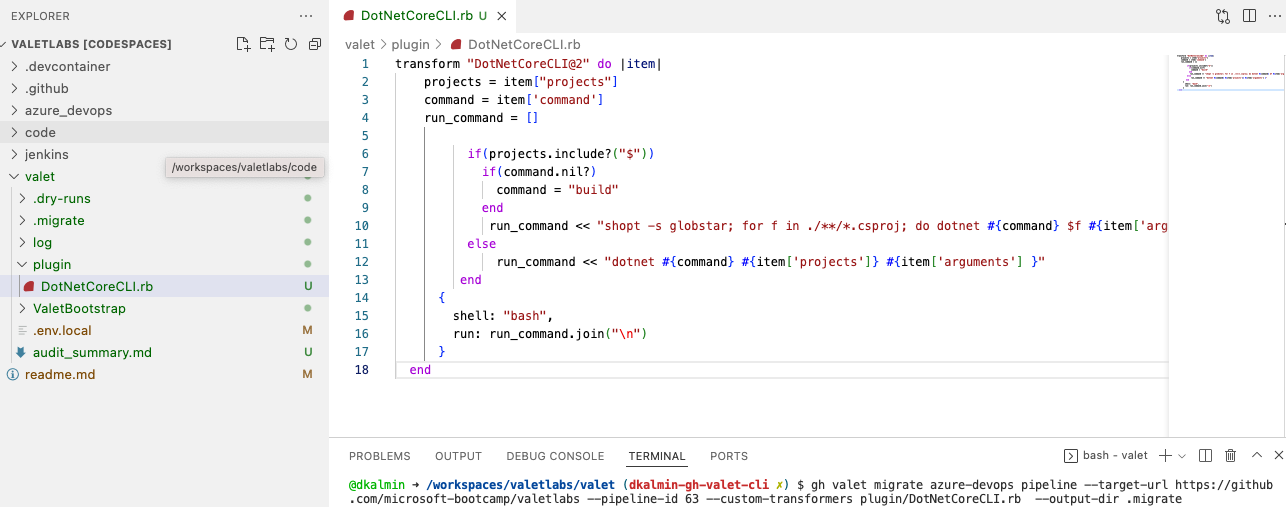
Add the following code to the ruby file:
|
|
``` Ruby
|
|
transform "DotNetCoreCLI@2" do |item|
|
|
projects = item["projects"]
|
|
command = item["command"]
|
|
run_command = []
|
|
|
|
if projects.include?("$")
|
|
command = "build" if command.nil?
|
|
run_command << "shopt -s globstar; for f in ./**/*.csproj; do dotnet #{command} $f #{item['arguments']} ; done"
|
|
else
|
|
run_command << "dotnet #{command} #{item['projects']} #{item['arguments']}"
|
|
end
|
|
|
|
{
|
|
shell: "bash",
|
|
run: run_command.join("\n")
|
|
}
|
|
end
|
|
```
|
|
|
|
## Migrate with a custom transformer
|
|
|
|
Run the `gh valet migrate` command from the `valet` directory with the transformer again and pass it the custom plugin. Look at the result and see if it results in a successful build.
|
|
|
|
```
|
|
gh valet migrate azure-devops pipeline --target-url https://github.com/GITHUB-ORG/GITHUB-REPO --pipeline-id PIPELINE-ID --custom-transformers plugin/DotNetCoreCLI.rb --output-dir migrate
|
|
```
|
|
|
|
### Example
|
|
|
|
|
|
## View the pull request
|
|
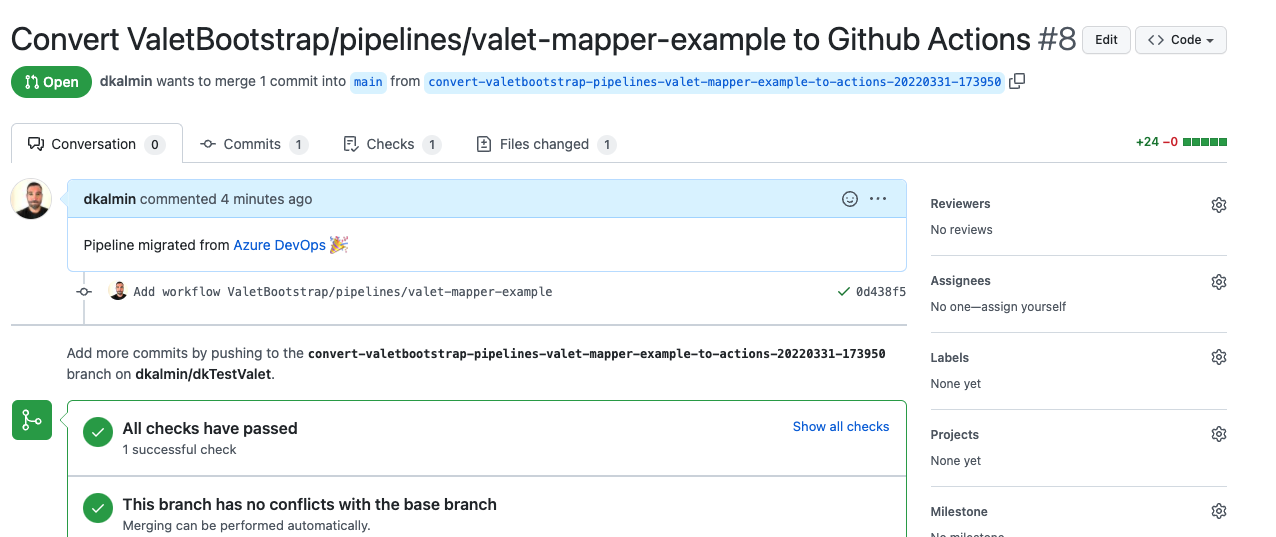
The migrate output will show you the pull request on GitHub. Note here that the checks on the pull request all passed!
|
|
|
|
### Example
|
|
|
|
|