
5.3 KiB
Dry run the migration of an Jenkins pipeline to GitHub Actions
In this lab, you will use the Valet dry-run command to convert a Jenkins pipeline to its equivalent GitHub Actions workflow.
The end result of this command will be the actions workflow written to your local filesystem.
Prerequisites
- Followed steps to set up your codespace environment.
- Completed the configure lab
- Completed the audit lab
Perform a dry-run
We will be performing a dry-run against a preconfigured pipeline in the Jenkins instance. Before running the command we need to collect some information:
- What is the name of the pipeline we want to convert? test_pipeline
- What is the source URL of the pipeline we want to convert? http://localhost:8080/job/test_pipeline
- Where do we want to store the result? ./tmp/dry-run-lab. This can be any valid path on the system. In the case of codespaces it is generally best to use
./tmp/SOME_DIRECTORY_HEREso the files show in explorer
Steps
-
Navigate to the codespace terminal
-
Run the dry-run command using the values determined above
gh valet dry-run jenkins --source-url http://localhost:8080/job/test_pipeline -o .tmp/jenkins/dry-run -
When the command finishes the output files should be printed to the terminal.

-
Open generated actions workflow
- Find
./tmp/dry-run-lab/valetin the file explorer pane in codespaces. - Click
test_pipeline.ymlto open
- Find
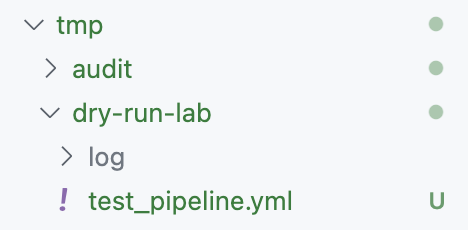
Review dry-run output
The dry-run output will show you the GitHub Actions yaml that would be migrated to GitHub with the migrate command. We will now take a quick look at what was generated.
Click to Expand
Jenkins Pipeline
pipeline {
    agent {
        label 'TeamARunner'
    }

    environment {
        DISABLE_AUTH = 'true'
        DB_ENGINE    = 'sqlite'
    }

    stages {
        stage('build') {
            steps {
                echo "Database engine is ${DB_ENGINE}"
                sleep 80
                echo "DISABLE_AUTH is ${DISABLE_AUTH}"
            }
        }
        stage('test') {
            steps{
                junit '**/target/*.xml'
            }
        }
    }
}
Actions Workflow
name: test_pipeline
on:
  push:
    paths: "*"
  schedule:
  - cron: 0-29/10 * * * *
env:
  DISABLE_AUTH: 'true'
  DB_ENGINE: sqlite
jobs:
  build:
    runs-on:
      - self-hosted
      - TeamARunner
    steps:
    - name: checkout
      uses: actions/checkout@v2
    - name: echo message
      run: echo "Database engine is ${{ env.DB_ENGINE }}"
#     # This item has no matching transformer
#     - sleep:
#       - key: time
#         value:
#           isLiteral: true
#           value: 80
    - name: echo message
      run: echo "DISABLE_AUTH is ${{ env.DISABLE_AUTH }}"
  test:
    runs-on:
      - self-hosted
      - TeamARunner
    needs: build
    steps:
    - name: checkout
      uses: actions/checkout@v2
    - name: Publish test results
      uses: EnricoMi/[email protected]
      if: always()
      with:
        files: "**/target/*.xml"
In the Jenkins pipeline we have 2 stages and 4 steps that run on the self-hosted runner labeled TeamARunner.
In the Actions workflow we have the same steps and the stages are now being enforced using the needs keyword. We can see this if we examine the test job, it has needs: build, which makes it depend on the build job.
- stages: test
+ needs: build
The agent in the Jenkins pipeline has been transformed to runs-on on each of the jobs.
- agent {
-   label 'TeamARunner'
- }
+ runs-on:
+   - self-hosted
+   - TeamARunner
And the echo commands remain mostly the same
- echo "Database engine is ${DB_ENGINE}"
+ - name: echo message
+   run: echo "DISABLE_AUTH is ${{ env.DISABLE_AUTH }}"
Note how Valet was not able to find a suitable conversion for the sleep command, and it added a comment to the yaml so this information was not lost, and it could be addressed manually later if needed.
- sleep 80
+ #     # This item has no matching transformer
+ #     - sleep:
+ #       - key: time
+ #         value:
+ #           isLiteral: true
+ #           value: 80
Lastly, the junit command was transformed using a third party action EnricoMi/[email protected]
- junit '**/target/*.xml'
+ - name: Publish test results
+   uses: EnricoMi/[email protected]
+   if: always()
+   with:
+     files: "**/target/*.xml"
Try constructing and running the dry-run command yourself. Hint, you should just have to change the project name.
Next Lab
TODO