
7.6 KiB
7.6 KiB
Audit GitLab using the Valet audit command
In this lab, you will use Valet to audit a GitLab namespace. The audit command will scan the GitLab namespace provided for all projects with pipelines that have run at least once, perform a dry-run on each of those pipelines, and finally perform an aggregation of all of the transformed workflows. This aggregate summary can be used as a planning tool and help understand how complete of a migration is possible with Valet.
The goal of this lab is to performed an audit on the demo GitLab instance, and gain a good understanding of the components that make up an audit output.
Prerequisites
Perform an audit
Before running the command we need to collect some information:
- What namespace or group do we want to audit? valet
- Where do we want to store the result? tmp/audit
Steps
- Navigate to the codespace terminal.
- Run the following Valet audit command with the provided answers above:
gh valet audit gitlab --output-dir tmp/audit --namespace valet
- Valet will print the locations of the audit results in the terminal when complete
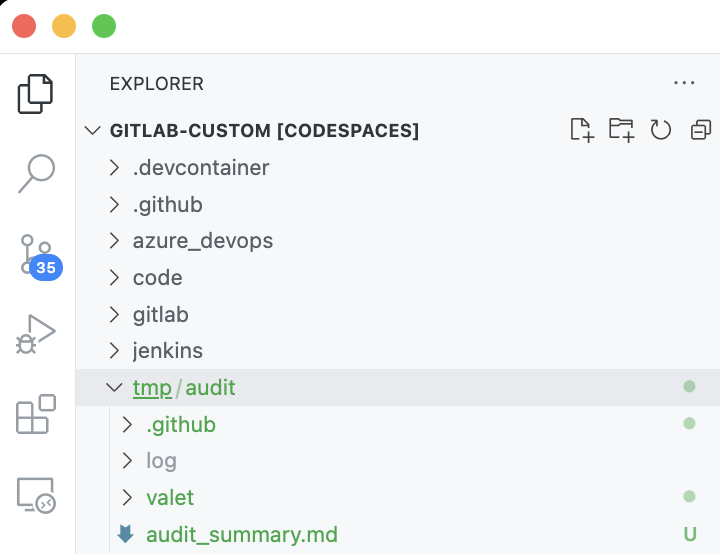
Audit Files
The audit command outputs the following files
| File Type | Naming Convention | Description |
|---|---|---|
| GitLab Pipeline source | valet/PROJECT_NAME.source.yml | The .gitlab-ci.yml file in the GitLab Project |
| GitLab Project configuration | valet/PROJECT_NAME.config.json | Contains meta data retrieved for the GitLab Project |
| Valet log file | log/valet-TIMESTAMP.log | Log generated during an audit. Mainly used for troubleshooting |
| GitHub Action workflows | valet/PROJECT_NAME.yml | GitHub Actions workflow that would be migrated to GitHub |
| Error file | valet/PROJECT_NAME.error.txt | Created when there is a error transforming the pipeline |
| Audit Summary | audit_summary.md | Contains a summary of audit results and the main file of interest to understand the how complete of a migration can be done with Valet |
| GitHub Actions Reusable Workflows & Composite Actions | .github/workflows/NAME_HERE.yml | These files will only appear if Valet encountered a pipeline that would generated them. These files would be part of the migration to GitHub if they existed |
Review audit summary
- Under the
auditfolder find theaudit_summary.md - Right-click the
audit_summary.mdfile and selectOpen Preview - This file contains details about what can be migrated 100% automatically vs. what will need some manual intervention or aren't supported by GitHub Actions.
- Review the file, it should match the
audit_summarybelow:
audit_summary.md (Click to expand)
# Audit summary

Summary for [GitLab instance](http://localhost/valet)

- Valet version: **0.1.0.13413 (9623ae73787971925a4a05e83a947108291d2f15)**
- Performed at: **8/16/22 at 12:52**

## Pipelines

Total: **11**

- Successful: **10 (90%)**
- Partially successful: **0 (0%)**
- Unsupported: **1 (9%)**
- Failed: **0 (0%)**

### Job types

Supported: **10 (90%)**

- YAML: **10**

Unsupported: **1 (9%)**

- Auto DevOps: **1**

### Build steps

Total: **136**

Known: **135 (99%)**

- script: **62**
- checkout: **36**
- before_script: **19**
- artifacts: **5**
- cache: **4**
- after_script: **4**
- dependencies: **4**
- pages: **1**

Unsupported: **1 (0%)**

- artifacts.terraform: **1**

Actions: **137**

- run: **85**
- actions/checkout@v2: **36**
- actions/upload-artifact@v2: **5**
- actions/cache@v2: **4**
- actions/download-artifact@v2: **4**
- ./.github/workflows/a-.gitlab-ci.yml: **1**
- ./.github/workflows/b-.gitlab-ci.yml: **1**
- JamesIves/[email protected]: **1**

### Triggers

Total: **30**

Known: **30 (100%)**

- manual: **10**
- merge_request: **10**
- push: **10**

Actions: **20**

- workflow_dispatch: **10**
- push: **10**

### Environment

Total: **0**

Actions: **2**

- PASSWORD: **1**
- ENVIRONMENT: **1**

### Other

Total: **10**

Known: **10 (100%)**

- auto_cancel_pending_pipelines: **10**

Actions: **57**

- image: **24**
- cancel_in_progress: **10**
- group: **10**
- GIT_SUBMODULE_STRATEGY: **3**
- docker:dind: **2**
- mysql:latest: **2**
- redis:latest: **2**
- postgres:latest: **2**
- PLAN: **1**
- PLAN_JSON: **1**

### Manual tasks

Total: **1**

Secrets: **1**

- `${{ secrets.PASSWORD }}`: **1**

### Successful

#### valet/included-files-example

- [valet/included-files-example.yml](valet/included-files-example.yml)
- [valet/included-files-example.config.json](valet/included-files-example.config.json)
- [valet/included-files-example.source.yml](valet/included-files-example.source.yml)

#### valet/terraform-example

- [valet/terraform-example.yml](valet/terraform-example.yml)
- [valet/terraform-example.config.json](valet/terraform-example.config.json)
- [valet/terraform-example.source.yml](valet/terraform-example.source.yml)

#### valet/child-parent-example

- [valet/child-parent-example.yml](valet/child-parent-example.yml)
- [.github/workflows/a-.gitlab-ci.yml](.github/workflows/a-.gitlab-ci.yml)
- [.github/workflows/b-.gitlab-ci.yml](.github/workflows/b-.gitlab-ci.yml)
- [valet/child-parent-example.config.json](valet/child-parent-example.config.json)
- [valet/child-parent-example.source.yml](valet/child-parent-example.source.yml)

#### valet/include-file-example

- [valet/include-file-example.yml](valet/include-file-example.yml)
- [valet/include-file-example.config.json](valet/include-file-example.config.json)
- [valet/include-file-example.source.yml](valet/include-file-example.source.yml)

#### valet/basic-pipeline-example

- [valet/basic-pipeline-example.yml](valet/basic-pipeline-example.yml)
- [valet/basic-pipeline-example.config.json](valet/basic-pipeline-example.config.json)
- [valet/basic-pipeline-example.source.yml](valet/basic-pipeline-example.source.yml)

#### valet/gatsby-example

- [valet/gatsby-example.yml](valet/gatsby-example.yml)
- [valet/gatsby-example.config.json](valet/gatsby-example.config.json)
- [valet/gatsby-example.source.yml](valet/gatsby-example.source.yml)

#### valet/android-example

- [valet/android-example.yml](valet/android-example.yml)
- [valet/android-example.config.json](valet/android-example.config.json)
- [valet/android-example.source.yml](valet/android-example.source.yml)

#### valet/dotnet-example

- [valet/dotnet-example.yml](valet/dotnet-example.yml)
- [valet/dotnet-example.config.json](valet/dotnet-example.config.json)
- [valet/dotnet-example.source.yml](valet/dotnet-example.source.yml)

#### valet/node-example

- [valet/node-example.yml](valet/node-example.yml)
- [valet/node-example.config.json](valet/node-example.config.json)
- [valet/node-example.source.yml](valet/node-example.source.yml)

#### valet/rails-example

- [valet/rails-example.yml](valet/rails-example.yml)
- [valet/rails-example.config.json](valet/rails-example.config.json)
- [valet/rails-example.source.yml](valet/rails-example.source.yml)

### Failed

#### valet/autodevops-example

- [valet/autodevops-example.error.txt](valet/autodevops-example.error.txt)
- [valet/autodevops-example.config.json](valet/autodevops-example.config.json)