03753a327f
* Update readme.md

* Update readme.md

* Update valet-audit-lab.md

* Delete valet

* Delete valet-update

* Update devcontainer.json

* Update valet-audit-lab.md

* Update valet-dry-run-lab.md

* Update valet-migrate-custom-lab.md

* Update valet-migrate-lab.md

* Update valet-migrate-lab.md

* Update valet-audit-lab.md

* Update valet-dry-run-lab.md

* Update valet-migrate-custom-lab.md

* Update .env.local

* Update valet-migrate-lab.md

* Update valet-audit-lab.md

* Update valet-dry-run-lab.md

* Update valet-migrate-lab.md

* Update valet-migrate-custom-lab.md

* Update devcontainer.json

* Update devcontainer.json

* Create setenvars.sh

* Update readme.md

* Update readme.md

* Update valet-audit-lab.md

* Update valet-dry-run-lab.md

* Update valet-migrate-lab.md

* Update valet-migrate-custom-lab.md

* Update and rename setenvars.sh to setupcodespace.sh

* Update devcontainer.json

* Update azure_devops/readme.md

Co-authored-by: Ethan Dennis <[email protected]>

* Update readme.md

* Update azure_devops/readme.md

Co-authored-by: Ethan Dennis <[email protected]>

* Update azure_devops/valet-audit-lab.md

Co-authored-by: Ethan Dennis <[email protected]>

* Update azure_devops/valet-audit-lab.md

Co-authored-by: Ethan Dennis <[email protected]>

* Update azure_devops/valet-dry-run-lab.md

Co-authored-by: Ethan Dennis <[email protected]>

* Update azure_devops/valet-dry-run-lab.md

Co-authored-by: Ethan Dennis <[email protected]>

* Update azure_devops/valet-dry-run-lab.md

Co-authored-by: Ethan Dennis <[email protected]>

* Update azure_devops/valet-migrate-custom-lab.md

Co-authored-by: Ethan Dennis <[email protected]>

* Update azure_devops/valet-dry-run-lab.md

Co-authored-by: Ethan Dennis <[email protected]>

* Update readme.md

* Update readme.md

* Update devcontainer.json

* Update devcontainer.json

* Update readme.md

* Update devcontainer.json

* Update readme.md

* Update valetbsazdo.yml

* Create .gitignore

* Update readme.md

* Update readme.md

* Update azDevOps.ps1

* Delete updateEnvs.ps1

* Update devcontainer.json

* Update readme.md

* Update azure_devops/valet-audit-lab.md

Co-authored-by: David Hathaway <[email protected]>

* Update azure_devops/valet-audit-lab.md

Co-authored-by: David Hathaway <[email protected]>

* Update valet-audit-lab.md

* Update valet-dry-run-lab.md

* Update azure_devops/valet-dry-run-lab.md

Co-authored-by: David Hathaway <[email protected]>

* Update azure_devops/valet-migrate-lab.md

Co-authored-by: David Hathaway <[email protected]>

* Update valet-dry-run-lab.md

* Update readme.md

* Update readme.md

* Update setupcodespace.sh

* Rename .env.local to .env.local.template

* Update .gitignore

Co-authored-by: Ethan Dennis <[email protected]>
Co-authored-by: David Hathaway <[email protected]>
2.7 KiB
2.7 KiB
Audit Azure DevOps pipelines using the Valet audit command
In this lab, you will use Valet to audit an Azure DevOps organization. The audit command can be used to scan a CI server and output a summary of the current pipelines. This summary can then be used to plan the timeline and effort required to migrate to GitHub Actions.
Prerequisites
- Follow all steps here to set up your environment
- Create or start a codespace in this repository (if not started)
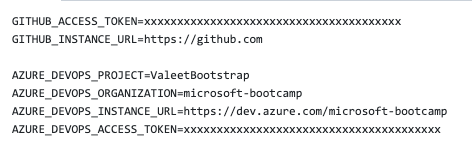
- Verify or add the following values to the
valet/.env.localfile. All values were created here
GITHUB_ACCESS_TOKEN=<GithHub PAT generated>
GITHUB_INSTANCE_URL=https://github.com/

AZURE_DEVOPS_PROJECT=<Project identified>
AZURE_DEVOPS_ORGANIZATION=<Org identified>
AZURE_DEVOPS_INSTANCE_URL=<DevOps instance>
AZURE_DEVOPS_ACCESS_TOKEN=<Token Generated>
Example
Perform an audit
You will use the codespace preconfigured in this repository to perform the audit.
- Navigate to the codespace Visual Studio Code terminal
- Verify you are in the
valetdirectory - Now, from the
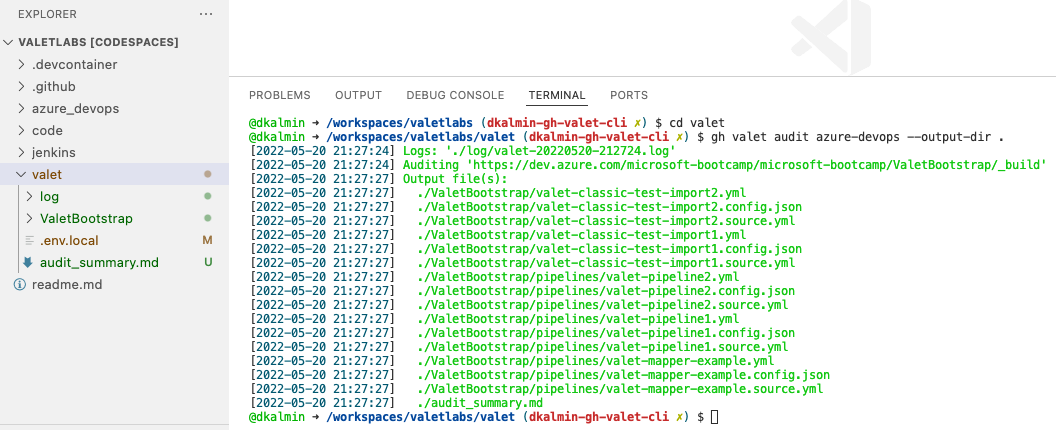
valetfolder in your repository, run Valet to verify your Azure DevOps configuration:
gh valet audit azure-devops --output-dir .
Example

- Valet displays green log files to indicate a successful audit
Example
View audit output
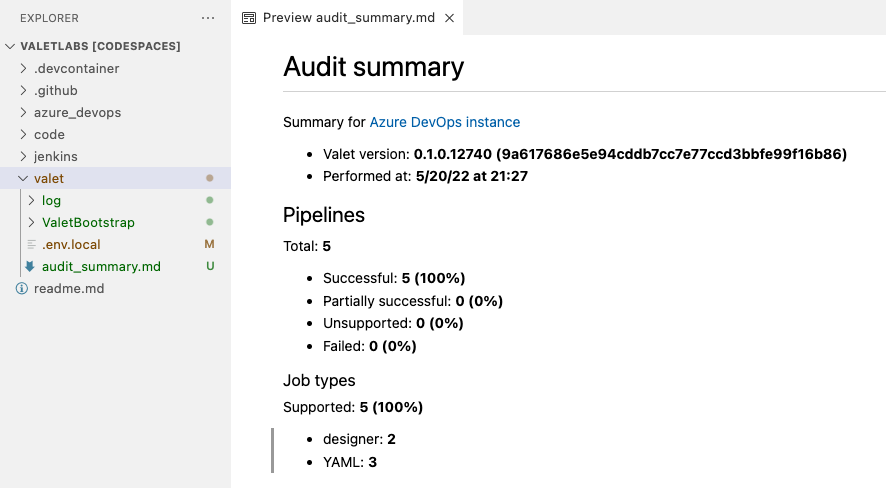
The audit summary, logs, Azure DevOps yml, and GitHub yml should all be located in the valet folder.
- Under the
valetfolder find theaudit_summary.md - Right-click the
audit_summary.mdfile and selectOpen Preview - The file contains details about your current pipelines and what can be migrated 100% automatically vs. what will need some manual intervention or aren't supported by GitHub Actions.
- Review the file.
Example
Review the pipelines
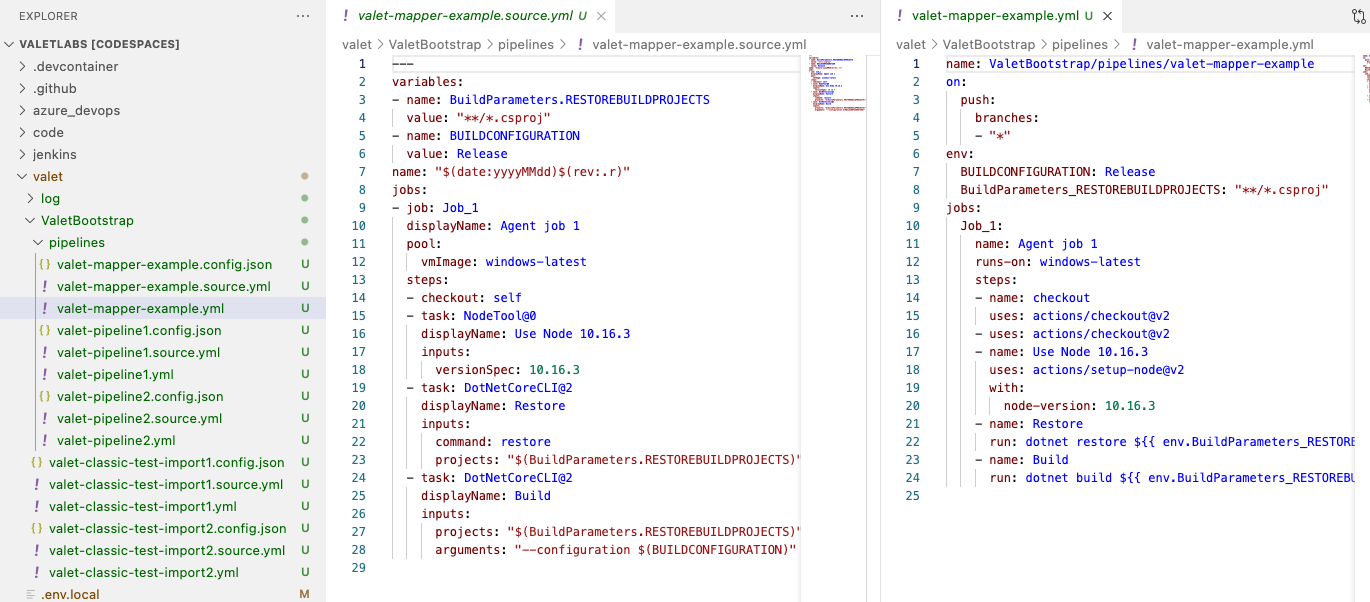
The audit command grabs the yml, classic, and release pipelines from Azure DevOps and converts them to GitHub Actions.
Example
View the source yml and the proposed GitHub yml