2022-05-10 14:32:07 -07:00
# Dry run the migration of an Azure DevOps pipeline to GitHub Actions
2022-05-25 10:57:51 -07:00
In this lab, you will use the `valet dry-run` command to convert an Azure DevOps pipeline to it's equivalent GitHub Actions workflow and write the workflow to your local filesystem.
- [Prerequisites ](#prerequisites )
- [Identify the Azure DevOps pipeline ID to use ](#identify-the-azure-devops-pipeline-id-to-use )
- [Perform a dry run ](#perform-a-dry-run )
- [View dry-run output ](#view-dry-run-output )
2022-06-29 10:28:06 -07:00
- [Next Lab ](#next-lab )
2022-05-10 14:32:07 -07:00
## Prerequisites
2022-06-29 10:28:06 -07:00
1. Follow all steps [here ](../azure_devops#readme ) to set up your environment
2022-05-10 14:32:07 -07:00
2. Create or start a codespace in this repository (if not started)
3. You have completed the [Valet audit lab ](valet-audit-lab.md ).
## Identify the Azure DevOps pipeline ID to use
You will need a pipeline ID to perform the dry run
2022-05-25 10:57:51 -07:00
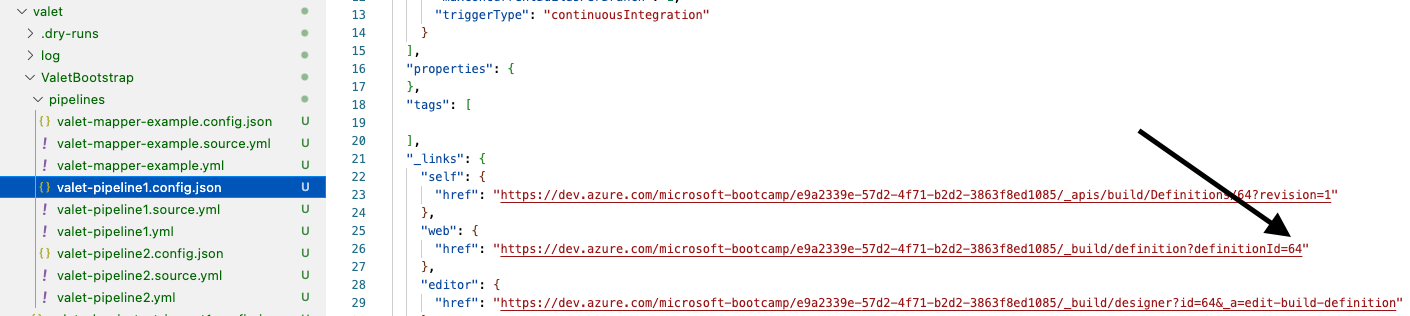
1. Go to the `valet/ValetBootstrap/pipelines` folder
2022-06-29 10:28:06 -07:00
2. Open the `valet/ValetBootstrap/pipelines/valet-pipeline1.config.json` file
2022-05-25 10:57:51 -07:00
3. Look for the `$.web.href` link
2022-05-10 14:32:07 -07:00
4. At the end of the link is the pipeline ID. Copy or note the ID.
### Example
2022-05-25 10:57:51 -07:00
2022-05-10 14:32:07 -07:00
## Perform a dry run
You will use the codespace preconfigured in this repository to perform the dry run.
1. Navigate to the codespace Visual Studio Code terminal
2022-05-25 10:57:51 -07:00
2. Verify you are in the `valet` directory
2022-05-10 14:32:07 -07:00
```
2022-06-10 20:31:36 +00:00
gh valet dry-run azure-devops pipeline --pipeline-id PIPELINE-ID --output-dir dry-run
2022-05-10 14:32:07 -07:00
```
2022-05-25 10:57:51 -07:00
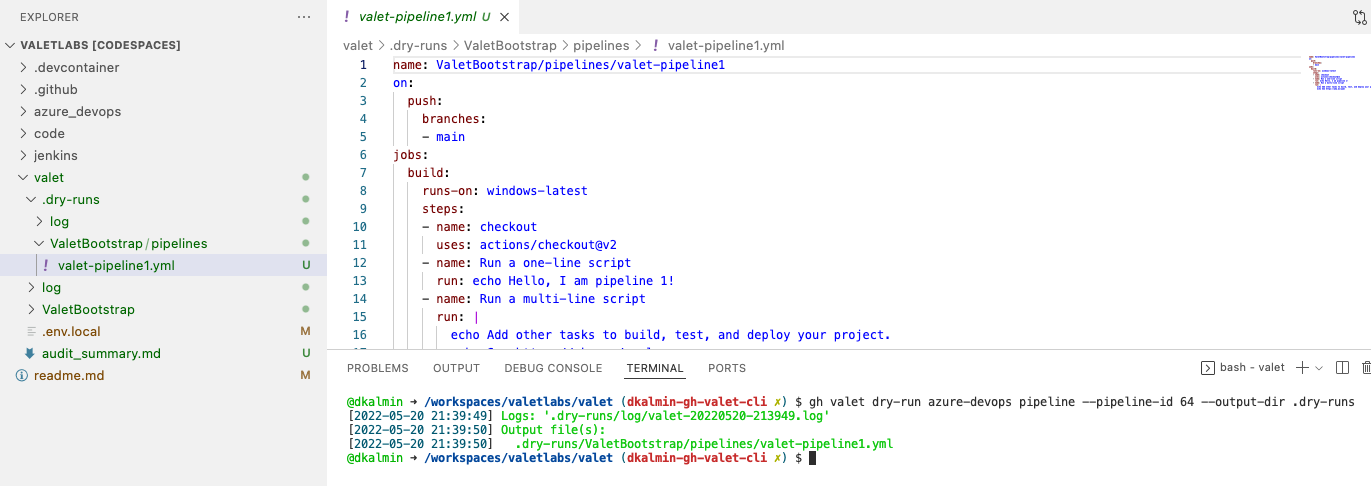
3. Now, from the `valet` folder in your repository, run `gh valet dry-run` to see the output:
2022-05-10 14:32:07 -07:00
### Example
2022-05-25 10:57:51 -07:00

2022-05-10 14:32:07 -07:00
2022-05-25 10:57:51 -07:00
4. Valet will create a folder called `dry-runs` under the `valet` folder that shows what will be migrated.
2022-05-10 14:32:07 -07:00
### Example
2022-05-25 10:57:51 -07:00
2022-05-10 14:32:07 -07:00
## View dry-run output
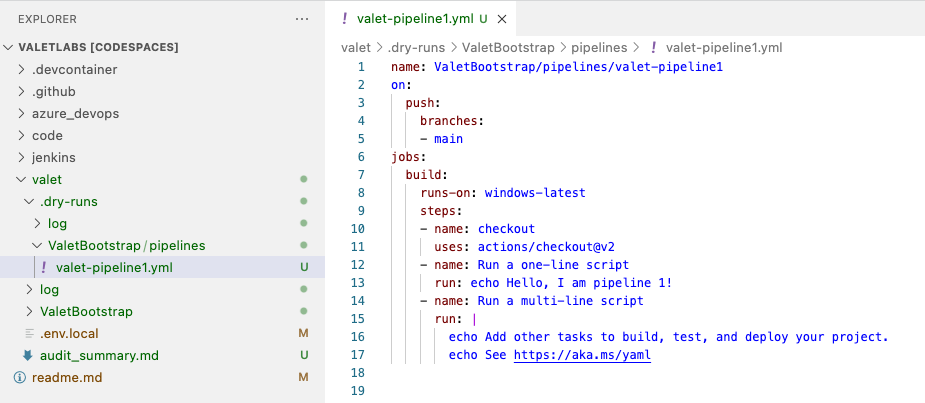
The dry-run output will show you the GitHub Actions yml that will be migrated to GitHub.
### Example
2022-05-25 10:57:51 -07:00
2022-06-29 10:28:06 -07:00
### Next Lab
[Migrate an Azure DevOps pipeline to GitHub Actions ](valet-migrate-lab.md )
