2022-11-03 12:47:40 -07:00
# Jenkins to Actions migrations powered by GitHub Actions Importer
2022-08-09 14:56:05 -07:00
2022-11-03 12:47:40 -07:00
These instructions will guide you through configuring a GitHub Codespaces environment that will be used in subsequent labs that demonstrate how to use GitHub Actions Importer to migrate Jenkins pipelines to GitHub Actions.
2022-08-09 14:56:05 -07:00
2022-08-31 21:00:10 -07:00
These steps **must** be completed prior to starting other labs.
2022-08-09 14:56:05 -07:00
2022-08-31 21:00:10 -07:00
## Create your own repository for these labs
2022-08-09 14:56:05 -07:00
2022-11-03 12:47:40 -07:00
1. Ensure that you have created a repository using the [actions/importer-labs ](https://github.com/actions/importer-labs ) as a template.
2022-08-09 14:56:05 -07:00
2022-09-13 08:55:51 -04:00
## Configure your codespace
2022-08-09 14:56:05 -07:00
2022-09-13 08:55:51 -04:00
1. Start a new codespace.
2022-08-25 16:28:07 -07:00
2022-09-16 12:34:38 -07:00
- Click the `Code` button on your repository's landing page.
- Click the `Codespaces` tab.
- Click `Create codespaces on main` to create the codespace.
- After the codespace has initialized there will be a terminal present.
2022-08-25 16:28:07 -07:00
2022-11-03 12:47:40 -07:00
2. Verify the GitHub Actions Importer CLI is installed and working. More information on the GitHub Actions Importer extension for the official GitHub CLI can be found [here ](https://github.com/github/gh-actions-importer ).
2022-08-25 12:59:38 -07:00
2022-09-16 12:34:38 -07:00
- Run the following command in the codespace's terminal:
2022-08-09 14:56:05 -07:00
2022-09-16 12:34:38 -07:00
```bash
2022-11-02 21:02:30 -07:00
gh actions-importer version
2022-09-16 12:34:38 -07:00
` ``
2022-08-09 14:56:05 -07:00
2022-09-16 12:34:38 -07:00
- Verify the output is similar to below.
2022-08-09 14:56:05 -07:00
2022-09-16 12:34:38 -07:00
` ``console
2022-11-02 21:02:30 -07:00
$ gh actions-importer version
2022-09-16 12:34:38 -07:00
gh version 2.14.3 (2022-07-26)
2022-11-03 12:47:40 -07:00
gh actions-importer github/gh-actions-importer v0.1.12
actions-importer/cli unknown
2022-09-16 12:34:38 -07:00
` ``
2022-11-03 12:47:40 -07:00
- If ` gh actions-importer version` did not produce similar output, refer to the troubleshooting [guide](#troubleshoot-the-actions-importer/cli).
2022-08-25 16:28:07 -07:00
2022-08-31 21:00:10 -07:00
## Bootstrap a Jenkins server
2022-09-16 12:34:38 -07:00
1. Execute the Jenkins setup script that will start a container with a Jenkins server running inside of it. This script should be executed when starting a new codespace or restarting an existing one.
2022-08-31 21:00:10 -07:00
2022-09-16 12:34:38 -07:00
- Run the following command from the codespace's terminal to start a Jenkins server:
2022-08-31 21:00:10 -07:00
2022-09-16 12:34:38 -07:00
` ``bash
./jenkins/bootstrap/setup.sh
` ``
2022-08-25 16:28:07 -07:00
2022-09-16 12:34:38 -07:00
- After some time, a pop-up box should appear with a link to the URL for your Jenkins server.
- You can also access the URL by going to the ` Ports` tab in your terminal. Right-click the URL listed under the ` Local Address` and click the ` Open in Browser` tab.
2022-08-09 14:56:05 -07:00
2022-08-31 21:00:10 -07:00
2. Open the Jenkins server in your browser and use the following credentials to authenticate:
2022-08-09 14:56:05 -07:00
2022-09-16 12:34:38 -07:00
- Username: ` admin`
- Password: ` password`
2022-08-31 21:00:10 -07:00
2022-09-16 12:34:38 -07:00
3. Once authenticated, you should see a Jenkins server with a few predefined pipelines.
2022-08-09 14:56:05 -07:00
## Labs for Jenkins
2022-11-03 12:47:40 -07:00
Perform the following labs to learn more about Actions migrations with GitHub Actions Importer:
2022-08-09 14:56:05 -07:00
2022-11-03 12:47:40 -07:00
1. [Configure credentials for GitHub Actions Importer](1-configure.md)
2022-09-01 07:40:00 -07:00
2. [Perform an audit of a Jenkins server](2-audit.md)
2022-09-16 12:34:38 -07:00
3. [Forecast potential build runner usage](3-forecast.md)
4. [Perform a dry-run migration of a Jenkins pipeline](4-dry-run.md)
2022-11-03 12:47:40 -07:00
5. [Use custom transformers to customize GitHub Actions Importer's behavior](5-custom-transformers.md)
2022-09-16 12:34:38 -07:00
6. [Perform a production migration of a Jenkins pipeline](6-migrate.md)
2022-08-09 14:56:05 -07:00
2022-11-03 12:47:40 -07:00
## Troubleshoot the GitHub Actions Importer CLI
2022-08-09 14:56:05 -07:00
2022-11-03 12:47:40 -07:00
The CLI extension for GitHub Actions Importer can be manually installed by following these steps:
2022-08-09 14:56:05 -07:00
2022-08-10 13:53:03 -07:00
- Verify you are in the codespace terminal
2022-09-13 08:55:51 -04:00
- Run this command from within the codespace terminal:
2022-08-09 14:56:05 -07:00
2022-08-31 21:00:10 -07:00
` ``bash
2022-11-03 12:47:40 -07:00
gh extension install github/gh-actions-importer
2022-08-31 21:00:10 -07:00
` ``
2022-08-10 13:32:19 -07:00
2022-08-31 21:00:10 -07:00
- Verify the result of the install contains:
2022-08-10 13:32:19 -07:00
2022-09-16 12:34:38 -07:00
` ``console
2022-11-03 12:47:40 -07:00
$ gh extension install github/gh-actions-importer
✓ Installed extension github/gh-actions-importer
2022-08-31 21:00:10 -07:00
` ``
- If you get an error similar to the image below, then click the link in the terminal output to authorize the token.
- Restart the codespace after clicking the link.

2022-11-03 12:47:40 -07:00
- Verify GitHub Actions Importer CLI extension is installed and working by running the following command from the codespace terminal:
2022-08-31 21:00:10 -07:00
` ``bash
2022-11-02 21:02:30 -07:00
gh actions-importer version
2022-08-31 21:00:10 -07:00
` ``
## Troubleshooting the Jenkins server
Follow these steps if the Jenkins server does not start correctly after running the setup script:
2022-09-13 08:55:51 -04:00
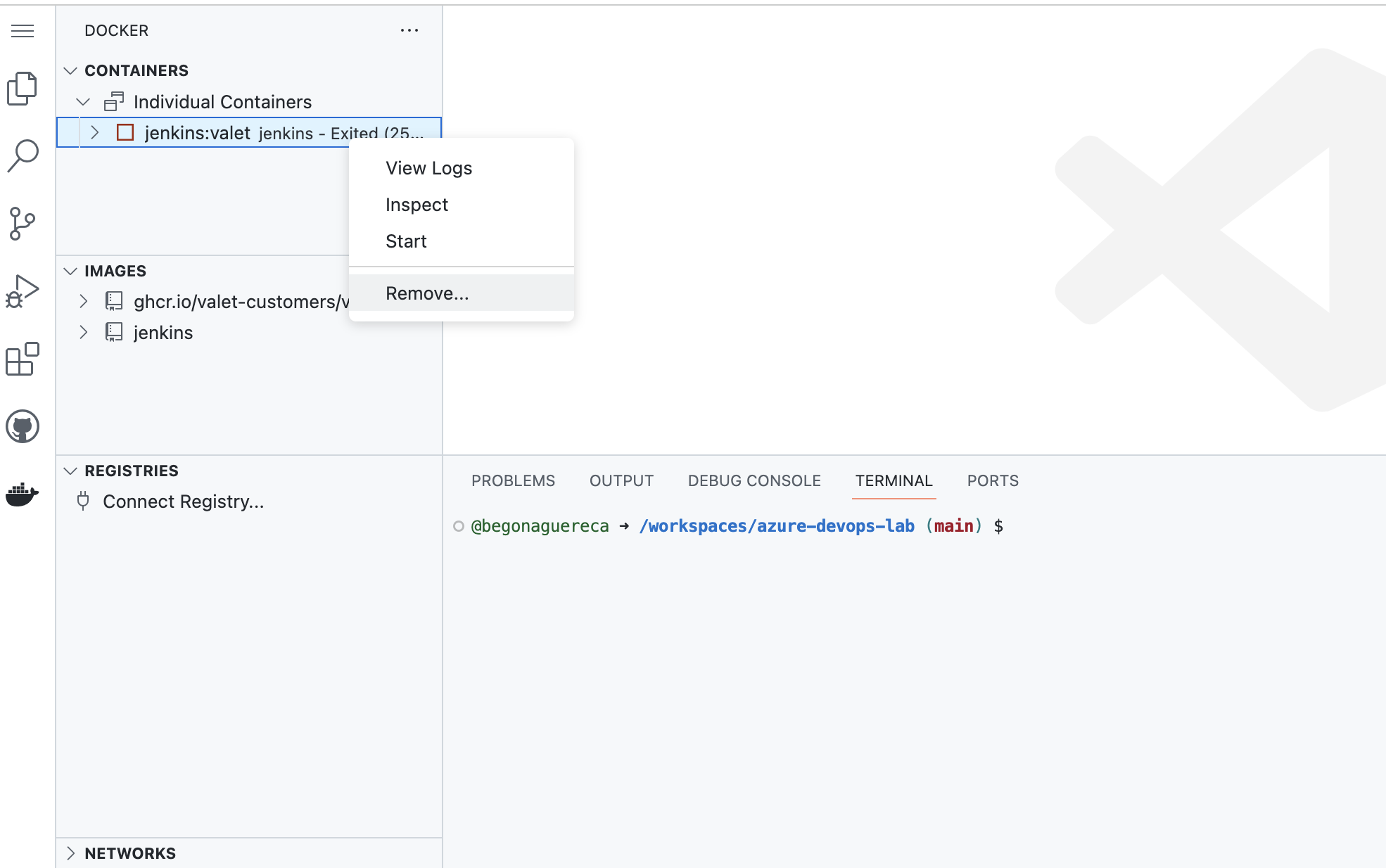
1. On the left side of the codespace, navigate to the ` Docker` tab.
2022-11-03 12:47:40 -07:00
2. Under the ` Containers` tab you should see a docker container named ` jenkins:actions-importer` listed with a green play button ▶
2022-08-31 21:00:10 -07:00
2022-11-03 12:47:40 -07:00
- If you see the ` jenkins:actions-importer` container, but it has a red stopped symbol next to it ▢, right-click the container and click ` start`. The container should begin running again.
- If the container does not start even after trying to start it manually, right-click the ` jenkins:actions-importer` container and click the ` remove` button. Then, attempt to start the Jenkins server again by following the steps [here ](#bootstrap-a-jenkins-server ).
2022-08-31 21:00:10 -07:00