2022-09-01 09:57:41 -07:00
# Configure credentials for Valet
2022-08-10 16:38:31 -07:00
2022-09-01 09:57:41 -07:00
In this lab, you will use the `configure` CLI command to set the required credentials and information for Valet to use when working with Jenkins and GitHub.
2022-08-10 16:38:31 -07:00
2022-09-01 09:57:41 -07:00
You will need to complete all of the setup instructions [here ](./readme.md#configure-your-codespace ) prior to performing this lab.
## Configuring credentials
2022-08-10 16:38:31 -07:00
2022-09-01 09:57:41 -07:00
1. Open the Jenkins server in a new browser tab:
2022-09-20 12:05:36 -07:00
- Click the `PORTS` tab in the codespace terminal window.
- In the `PORTS` tab, find the row for port 8080.
- Hover over the address under the `Local Address` column and click the globe to "open in browser".
2022-08-11 15:53:36 -07:00
2022-09-01 09:57:41 -07:00
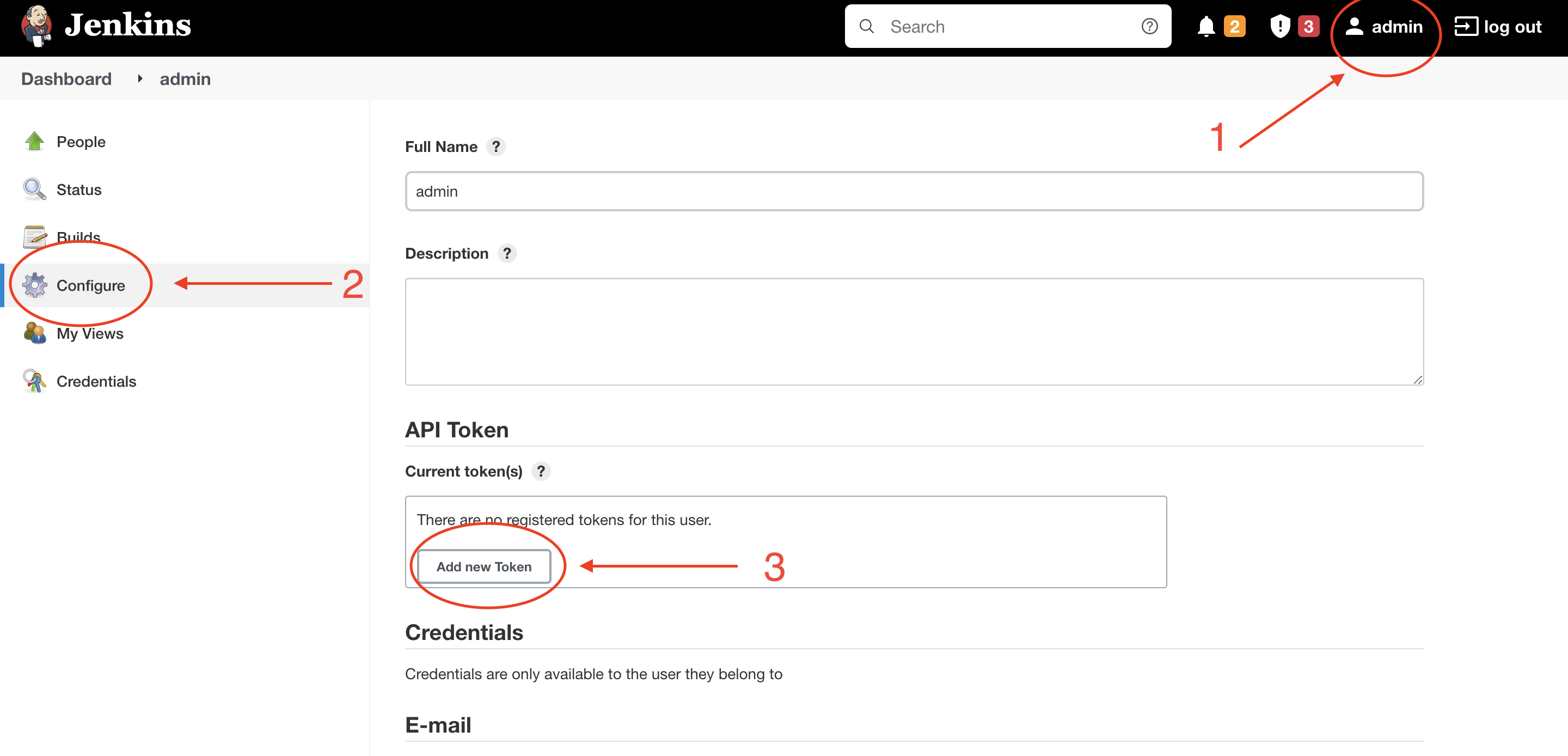
2. Create a Jenkins API token:
2022-09-20 12:05:36 -07:00
- In the top right menu bar, click the `admin` button.
- In the left panel, click the `Configure` gear.
- In the `API token` section, click the `Add new Token` button and click `Generate` .
- Copy the generated API token and save it in a safe location.
2022-08-11 15:53:36 -07:00
2022-09-20 12:05:36 -07:00
2022-09-01 09:57:41 -07:00
2022-09-13 08:55:51 -04:00
3. Create a GitHub personal access token (PAT):
2022-09-20 12:05:36 -07:00
- Open github.com in a new browser tab.
- In the top right corner of the UI, click your profile photo and click `Settings` .
- In the left panel, click `Developer Settings` .
- Click `Personal access tokens` and then `Legacy tokens` (if present).
- Click `Generate new token` and then `Generate new legacy token` . You may be required to authenticate with GitHub during this step.
2022-09-20 15:01:34 -07:00
- Name your token in the `Note` field.
2022-09-20 12:05:36 -07:00
- Select the following scopes: `workflow` and `read:packages` .
- Click `Generate token` .
- Copy the generated PAT and save it in a safe location.
2022-09-06 15:39:17 -07:00
2022-09-20 12:05:36 -07:00
4. Run the `configure` CLI command:
- Select the `TERMINAL` tab from within the codespace terminal window.
- Run the following command: `gh valet configure` .
- Use the down arrow key to highlight `Jenkins` , press the spacebar to select, and then press enter to continue.
2022-09-20 12:42:45 -07:00
- At the GitHub handle prompt, enter the GitHub username used to generate the GitHub PAT in step 3 and press enter.
2022-09-20 12:05:36 -07:00
- At the GitHub Container Registry prompt, enter the GitHub PAT generated in step 3 and press enter.
- At the GitHub PAT prompt, enter the GitHub PAT generated in step 3 and press enter.
- At the GitHub URL prompt, enter the GitHub instance URL or press enter to accept the default value (`https://github.com` ).
- At the Jenkins token prompt, enter the Jenkins access token from step 2 and press enter.
2022-09-20 12:42:45 -07:00
- At the Jenkins username prompt, enter `admin` and press enter.
2022-09-20 12:05:36 -07:00
- At the Jenkins URL prompt, enter `http://localhost:8080/` and press enter.
```console
$ gh valet configure
✔ Which CI providers are you configuring?: Jenkins
Enter the following values (leave empty to omit):
✔ GitHub handle used to authenticate with the GitHub Container Registry: mona
✔ Personal access token to authenticate with the GitHub Container Registry: ***************
✔ Personal access token for GitHub: ***************
✔ Base url of the GitHub instance: https://github.com
✔ Personal access token for Jenkins: ***************
✔ Username of Jenkins user: admin
✔ Base url of the Jenkins instance: https://localhost
Environment variables successfully updated.
` ``
2022-08-10 16:38:31 -07:00
2022-09-01 09:57:41 -07:00
## Verify your environment
2022-08-10 16:38:31 -07:00
2022-09-13 08:55:51 -04:00
To verify your environment is configured correctly, run the ` update` CLI command. The ` update` CLI command will download the latest version of Valet to your codespace.
2022-08-10 16:38:31 -07:00
2022-09-01 10:08:10 -07:00
1. In the codespace terminal run the following command:
2022-08-10 16:38:31 -07:00
2022-09-01 10:08:10 -07:00
` ``bash
gh valet update
` ``
2022-08-10 16:38:31 -07:00
2022-09-01 10:08:10 -07:00
2. You should see a confirmation that you were logged into the GitHub Container Registry and Valet was updated to the latest version.
2022-08-10 16:38:31 -07:00
2022-09-16 12:34:38 -07:00
` ``console
$ gh valet update
2022-09-01 10:08:10 -07:00
Login Succeeded
latest: Pulling from valet-customers/valet-cli
Digest: sha256:a7d00dee8a37e25da59daeed44b1543f476b00fa2c41c47f48deeaf34a215bbb
Status: Image is up to date for ghcr.io/valet-customers/valet-cli:latest
ghcr.io/valet-customers/valet-cli:latest
` ``
2022-08-10 16:38:31 -07:00
2022-09-06 15:39:17 -07:00
### Next lab
2022-08-10 16:38:31 -07:00
2022-09-01 10:08:10 -07:00
[Perform an audit of a Jenkins server ](2-audit.md#perform-an-audit-of-a-jenkins-server )
